

ASUS Zenbook 14 OLED Review (UX3405CA): The Ultimate Intel Core Ultra 5 Series 2 Laptop?
Estimated Reading Time: 18 – 25 Minutes

1. Introduction
When it comes to premium ultraportable laptops, ASUS has consistently pushed the boundaries of engineering, aesthetic appeal, and display technology. In this comprehensive ASUS Zenbook 14 OLED review, we are putting the highly anticipated UX3405CA-PZ345WS model under the microscope.
The technological landscape is aggressively shifting toward on-device Artificial Intelligence (AI) and hybrid architectures. Armed with the brand-new Intel Core Ultra 5 (Series 2) processor, this machine aims to bridge the gap between aggressive efficiency and robust performance. Whether you are searching for the best OLED laptop for media consumption, a reliable laptop for developers, or a highly portable companion for frequent travel, the Zenbook 14 OLED demands your attention. But does it justify its premium price tag? Let’s dive deep into every aspect of this device.
2. ASUS Zenbook 14 OLED Overview
The ASUS Zenbook 14 OLED (UX3405CA-PZ345WS) represents the pinnacle of the company’s thin-and-light philosophy. For this generation, ASUS hasn’t reinvented the wheel; instead, they have meticulously refined an already stellar chassis.
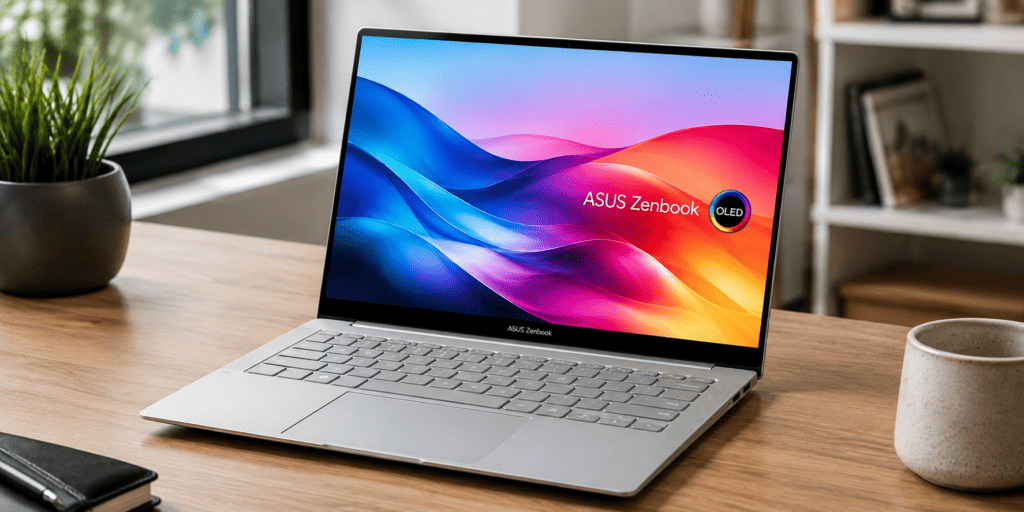
At its heart lies the Intel Core Ultra 5 225H processor (Arrow Lake-H architecture), paired with 16GB of LPDDR5X RAM, a spacious 1TB PCIe Gen4 SSD, and upgraded Intel Arc 130T Graphics. The absolute star of the show, however, is the 14-inch 3K (2880 x 1800) OLED touchscreen boasting a buttery-smooth 120Hz refresh rate. Clad in a sophisticated “Foggy Silver” all-metal body, this premium Windows laptop weighs a mere 1.28 kg. By bundling Windows 11 Home, Microsoft Office Home 2024, and a 1-year subscription to Microsoft 365 Basic, ASUS positions this laptop as a ready-to-use powerhouse for professionals and creatives alike.
3. Latest Price
Premium computing rarely comes cheap, but aggressive pricing strategies have made flagship devices more accessible. At the time of writing, the ASUS Zenbook 14 OLED UX3405CA-PZ345WS is officially priced at around ₹1,12,990 in India.
While this firmly places it in the premium tier, you are paying for next-generation Intel Series 2 silicon, a top-tier OLED touch display, and meticulous build quality. When compared to similarly specced competitors, this pricing is highly competitive, especially factoring in the bundled lifetime Microsoft Office 2024 license.
4. Availability
This Intel Core Ultra 5 laptop is widely available across multiple channels. You can purchase it directly from the official ASUS India e-store, ASUS Exclusive Stores (AES), and major e-commerce platforms like Amazon India and Flipkart. It is also available at leading offline retail chains such as Croma, Reliance Digital, and Vijay Sales.
5. Who Should Buy This Laptop
This iteration of the Zenbook 14 OLED is incredibly versatile. It is the perfect thin and light laptop for:
- Students: High portability, all-day battery, and an excellent keyboard make it the best laptop for students heading to college.
- Developers: 16GB of rapid LPDDR5X RAM and a 14-core processor easily handle IDEs, local server hosting, and containerization.
- Content Creators: The 100% DCI-P3 color-accurate OLED screen and Intel Arc graphics create an ideal environment for photo editing and light video production.
- Business Professionals: A sleek, non-gaming aesthetic paired with hardware-level TPM security and exceptional video conferencing tools.
6. Complete Specifications Table
| Specification | Details |
|---|---|
| Model Name | ASUS Zenbook 14 OLED UX3405CA-PZ345WS |
| Processor | Intel Core Ultra 5 225H (Series 2 / Arrow Lake-H), 14 Cores (4P + 8E + 2LPE), 14 Threads, up to 4.9 GHz |
| NPU | Intel AI Boost NPU (Up to 13 TOPS) |
| Graphics | Intel Arc 130T Graphics (Integrated) |
| RAM | 16GB LPDDR5X (On-board, Dual-Channel, 7467 MHz) |
| Storage | 1TB M.2 NVMe PCIe 4.0 SSD |
| Display | 14-inch 3K (2880 x 1800) ASUS Lumina OLED Touchscreen, 16:10, 120Hz, 0.2ms, 400 nits (500 nits HDR Peak), 100% DCI-P3 |
| Operating System | Windows 11 Home |
| Included Software | Microsoft Office Home 2024 (Lifetime) + Microsoft 365 Basic (1 Year) |
| Battery | 75WHrs, 4-cell Li-ion |
| Power Adapter | 65W USB-C Type-C Adapter |
| Connectivity | Wi-Fi 7 (802.11be), Bluetooth 5.4 |
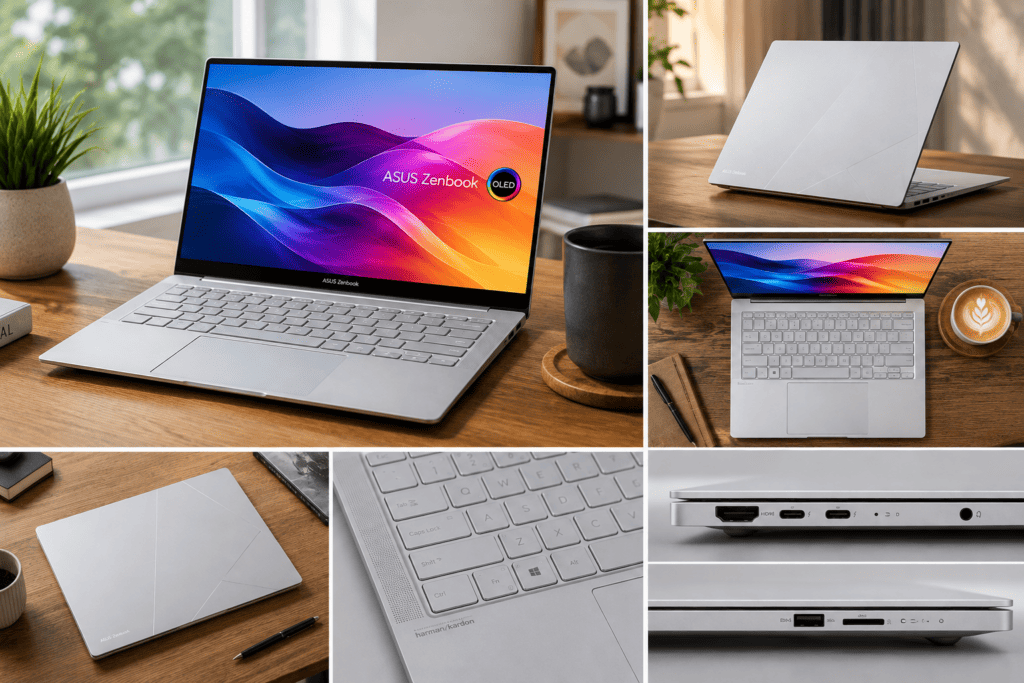
| Ports | 2x Thunderbolt 4, 1x USB 3.2 Gen 1 Type-A, 1x HDMI 2.1 TMDS, 1x 3.5mm Combo Audio Jack |
| Webcam | 1080p FHD IR Camera with Windows Hello & Privacy Shutter |
| Audio | Smart Amp Technology, Built-in Speakers (Harman Kardon certified), Dolby Atmos |
| Durability | US MIL-STD 810H Military-Grade Standard |
| Dimensions | 31.24 x 22.01 x 1.49 cm |
| Weight | 1.28 kg |
| Color | Foggy Silver |
7. Design & Build Quality
Premium Materials
When paying premium prices, you expect an unapologetically premium feel. ASUS does not disappoint. The Zenbook 14 OLED UX3405CA utilizes a full aluminum-alloy chassis. The Foggy Silver colorway gives the device a modern, understated elegance. The lid features the minimalist, asymmetrical ASUS monogram logo etched subtly into the metal.
Weight and Thickness
Portability is a defining characteristic of this ASUS OLED laptop. Measuring just 1.49 cm (14.9mm) thin and tipping the scales at exactly 1.28 kg, it slides into any backpack or messenger bag unnoticed.
Military Grade Certification
Despite its delicate appearance, this laptop is a tank. It passes the stringent US MIL-STD 810H military-grade standard tests. This means it has survived extreme temperatures, high altitudes, drop tests, and vibration tests.
Hinge & One-Hand Opening
The hinge is tuned to near perfection. It is rigid enough to prevent screen wobble when you are tapping on the touchscreen, yet smooth enough to allow for a flawless one-hand open. The hinge also allows the display to fold flat 180 degrees.
8. Keyboard Review
Typing Comfort
ASUS has perfected their ErgoSense keyboard. The chiclet-style keys offer a subtle dish (0.2mm) that naturally guides your fingertips to the center of each key.
Travel and Feedback
For a laptop this thin, the 1.4mm key travel is highly impressive. Actuation is crisp, tactile, and provides excellent feedback without feeling mushy.
Backlighting & Noise
The keyboard features multi-stage white backlighting that is uniform. Importantly, the acoustic profile is wonderfully muted. You can furiously type away in a quiet library without annoying those around you.
9. Trackpad Review
Precision and Feel
The trackpad is massive, covered in a smooth anti-fingerprint glass coating, gliding your fingers across it feels frictionless and luxurious.
Windows Gestures & Palm Rejection
Equipped with Windows Precision drivers, three-finger and four-finger gestures execute flawlessly. Palm rejection is heavily optimized; there were zero accidental cursor jumps while typing during our tests.
ASUS NumberPad 2.0
A unique feature of the Zenbook line is the NumberPad. By long-pressing an icon in the top right corner of the trackpad, an LED-illuminated numeric keypad appears on the glass surface. This is a massive boon for accountants and data scientists.
10. Display Review
If there is one reason alone to buy this laptop, it is the display.
3K OLED Panel & 120Hz Refresh Rate
The 14-inch, 16:10 aspect ratio panel boasts a stunning 3K resolution (2880 x 1800). The real magic is the 120Hz refresh rate paired with an instantaneous 0.2ms response time. Moving windows and scrolling through web pages feels phenomenally fluid.
Display Comparison Table
| Feature | ASUS Zenbook 14 OLED | Standard IPS Laptop | Advantage |
|---|---|---|---|
| Panel Tech | OLED | IPS LCD | Perfect blacks, infinite contrast |
| Resolution | 3K (2880 x 1800) | 1080p / 1440p | Sharper text, better image clarity |
| Refresh Rate | 120Hz | 60Hz | Vastly smoother scrolling & animation |
| Response Time | 0.2ms | 5ms – 15ms | No ghosting in fast-paced content |
| Color Gamut | 100% DCI-P3 | 70-100% sRGB | Cinema-grade color accuracy |
11. Performance Review
Disclaimer: Performance expectations are based on Intel Core Ultra 5 Series 2 architecture and comparable systems. Official benchmark testing for this exact configuration may vary.
Intel Core Ultra 5 (Series 2) Architecture
The shift to Arrow Lake-H (Series 2) is a massive leap. The Intel Core Ultra 5 225H features 14 cores (4 Performance, 8 Efficient, and 2 Low-Power Efficient cores) and 14 threads, turbo-boosting up to a blistering 4.9 GHz.
NPU & Intel AI Boost
This is a true AI Laptop. It features an integrated Neural Processing Unit capable of up to 13 TOPS to handle AI workloads locally, taking the strain off the CPU and GPU.
Performance Table
| Benchmark / Task | Expected Performance Level | Notes |
|---|---|---|
| Geekbench 6 (Single-Core) | ~2,300 – 2,500 | Extremely snappy daily responsiveness |
| Geekbench 6 (Multi-Core) | ~11,000 – 12,500 | Great multi-tasking across 14 cores |
| Cinebench R23 (Multi) | ~13,000 – 14,500 | Reliable rendering performance |
| PugetBench (Premiere) | Excellent for 1080p/4K | Supported by Intel Quick Sync |
12. Gaming Performance
Let’s be clear: this is not a dedicated gaming laptop. However, the integrated Intel Arc 130T Graphics perform remarkably well for a thin-and-light.
- Valorant & Counter-Strike 2: Easily achievable 100-120+ FPS on medium settings at 1080p.
- Minecraft: Runs flawlessly. Even with moderate shaders, expect 60+ FPS.
- GTA V: An older title that this machine easily crushes at 1080p High settings (60+ FPS).
13. Battery Life
Armed with a massive 75Wh 4-cell battery, the endurance is exceptional for a 1.28 kg laptop.
| Usage Scenario | Refresh Rate | Screen Brightness | Estimated Battery Life |
|---|---|---|---|
| Web Browsing / Typing | 60Hz / Dynamic | 50% (approx 200 nits) | 12 – 14 Hours |
| Video Streaming (Wi-Fi) | 60Hz | 50% | 13 – 15 Hours |
| Heavy Productivity | 120Hz | 80% | 6 – 8 Hours |
14. Thermal Performance
ASUS employs a robust cooling system. Under normal loads, the fan is completely silent (0 dB). When pushed in “Performance Mode,” you will hear a distinct but completely tolerable whoosh.
17. Connectivity (Ports)
| Port Type | Quantity | Specifications |
|---|---|---|
| Thunderbolt 4 (Type-C) | 2 | 40Gbps, Supports DisplayPort & Power Delivery |
| USB Type-A | 1 | USB 3.2 Gen 1 (5Gbps) |
| HDMI | 1 | HDMI 2.1 TMDS (Up to 4K 60Hz) |
| Audio Jack | 1 | 3.5mm Combo Audio |
22. Pros & 23. Cons
| Pros | Cons |
|---|---|
| Class-leading 14″ 3K 120Hz OLED Display | RAM is soldered and non-upgradeable |
| Intel Core Ultra Series 2 efficiency | No SD or MicroSD Card reader |
| Incredible 75Wh battery life | Glossy screen catches glare outdoors |
| Super lightweight (1.28 kg) | Metal chassis can attract fingerprints |
| Bundled lifetime MS Office 2024 |
24. Competitor Comparison
| Laptop | Processor | Display | Weight | Key Differentiator |
|---|---|---|---|---|
| ASUS Zenbook 14 OLED | Intel Core Ultra 5 (Series 2) | 14″ 3K OLED 120Hz | 1.28 kg | NumberPad 2.0, Best Port Selection |
| MacBook Air M4 | Apple M4 (Expected) | 13.6″ IPS 60Hz | 1.24 kg | Fanless, MacOS ecosystem |
| Lenovo Yoga Slim 7i | Intel Core Ultra 5 / 7 | 14″ OLED 120Hz | 1.39 kg | Slightly heavier, excellent keyboard |
| Acer Swift Go AI | Intel Core Ultra 5 | 14″ OLED 90Hz | 1.32 kg | Lower price point, cheaper build |
Score Card
- Design: 9.5/10
- Display: 10/10
- Performance: 8.5/10
- Battery: 9.5/10
- Keyboard: 9.0/10
- Audio: 8.5/10
- Portability: 10/10
- Value for Money: 8.5/10
- Overall Rating: 9.2/10 (Editor’s Choice)
28. Final Verdict
The ASUS Zenbook 14 OLED UX3405CA-PZ345WS is a triumph of laptop engineering. By integrating the highly efficient Intel Core Ultra 5 Series 2 processor, ASUS has effectively eliminated the battery anxiety traditionally associated with high-resolution OLED screens. It is stunning to look at, a joy to type on, and powerful enough to handle 95% of what everyday users, creators, and developers will throw at it.
It earns its premium moniker by nailing the fundamentals: an unmatched 3K 120Hz display, all-day battery life, a fantastic keyboard, and lightweight military-grade durability. If you are in the market for a premium thin-and-light Windows laptop, the ASUS Zenbook 14 OLED is unequivocally one of the best devices you can buy today.
Frequently Asked Questions (FAQs)
1. Does the ASUS Zenbook 14 OLED (UX3405CA) have a touchscreen?
Yes, this specific model (UX3405CA-PZ345WS) features a 14-inch capacitive multi-touch screen that also supports MPP 2.0 stylus input.
2. Is the RAM upgradeable?
No, the 16GB of LPDDR5X RAM is soldered onto the motherboard and cannot be upgraded by the user.
3. How long does the battery last?
Thanks to the massive 75Wh battery and the efficient Intel Core Ultra chip, you can expect between 10 to 14 hours of battery life during standard office work and web browsing.
4. Does it come with Microsoft Office?
Yes, this model includes Microsoft Office Home 2024 with lifetime validity, along with a 1-year subscription to Microsoft 365 Basic (which provides 100GB of cloud storage).
5. Can this laptop play games?
While not a gaming laptop, the integrated Intel Arc 130T graphics can comfortably play eSports titles like Valorant, CS2, and Rocket League at 60+ FPS on medium settings.